 SoloStock
Run your shop from your pocket — network or no network.
SoloStock keeps your stock, counter sales, customer credit, suppliers, expenses, quotes and invoices in one place. Nothing waits on a signal, and nothing gets lost when the phone does.
- 0
- downtime offline
- 7.5%
- VAT ready
- 1 tap
- shop backup
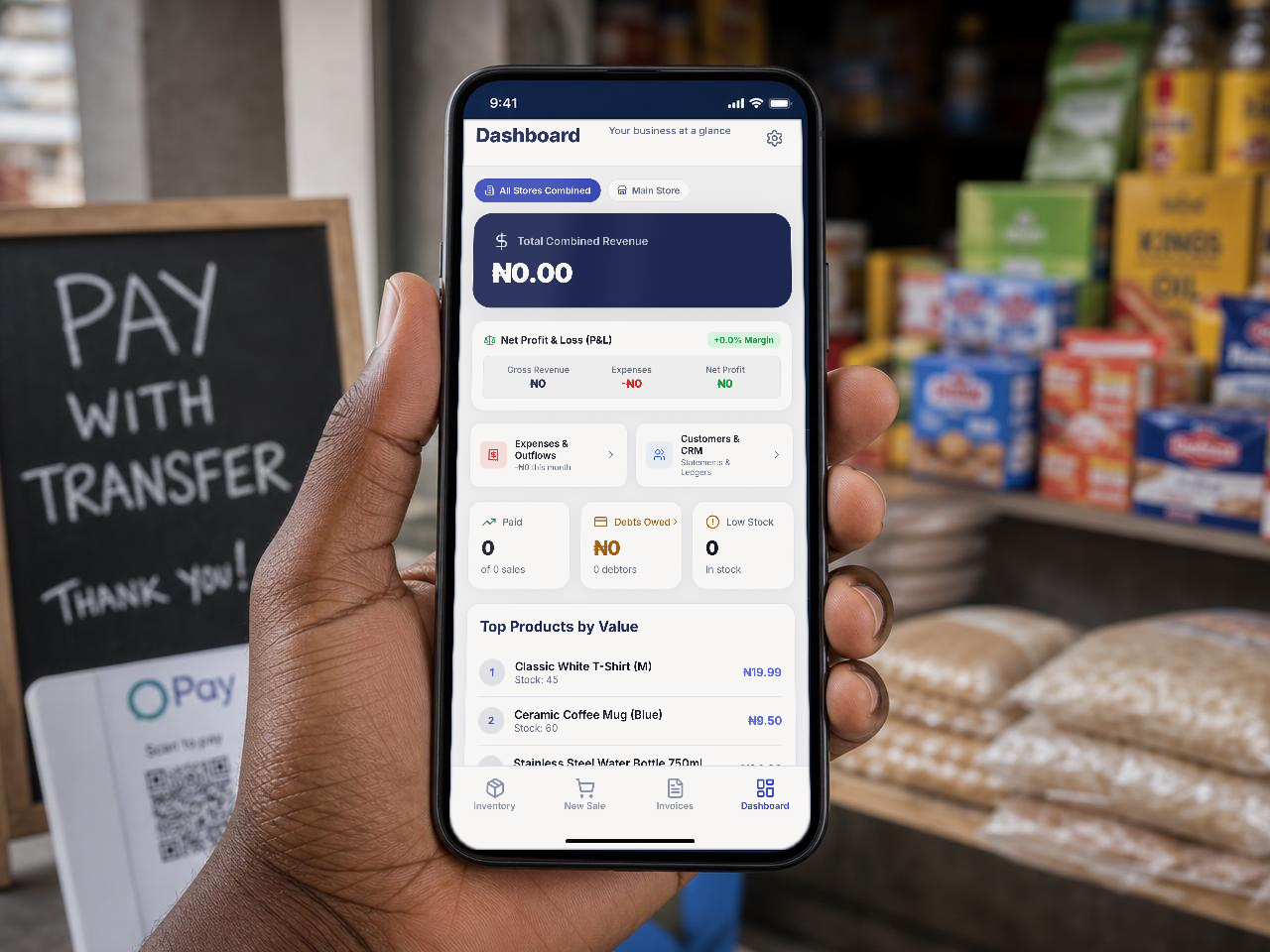
Everything your business needs as it grows
Inventory, sales, documents, customer records and business controls—built into the mobile app you can use without a signal.
Inventory that never lies
Products, cost price, selling price and stock counts saved on the device, with low-stock badges you set yourself.
Barcode & SKU scanning
Point the camera at a barcode to find or add an item instantly — no typing at the counter.
Fast counter checkout
Tap products into the cart, apply tax, take payment, and stock adjusts itself the moment the sale closes.
Customers & debtors
Keep phone numbers and purchase history, record credit sales, log part payments and see who still owes you.
Quotes, invoices & receipts
Move from a customer quote to a sale, then create branded PDF invoices and receipts to share or print.
Bulk import & tax exports
Bring in hundreds of items from Excel or CSV, and export revenue and tax records when you need them.
Works with no network
Everything happens on the device first. Sales keep running through blackouts and dead spots.
Backup & recovery
One tap saves a snapshot of your shop. A simple pairing code restores it on a new phone.
Staff roles & PIN lock
Attendants can sell but never see profit, cost prices or delete items. A 4-digit PIN switches back to owner mode.
Suppliers & restocking
Keep supplier details alongside your catalog so you know who supplies each item when it is time to replenish.
Recurring billing
Save repeat billing profiles for regular customers and create their documents without starting from scratch.
Audit history
Keep a clear record of staff activity and important business changes as your shop grows.
Choose your workspace theme
Work in Indigo Slate, Deep Lagoon, or Warm Sunset—three SoloStock themes designed for long shop days.
How to use SoloStock
Six steps from an empty app to a shop that keeps its own books.
- 1
Set up your shop
Add your business name, currency, tax rate, bank details and invoice details once. Takes about two minutes.
- 2
Load your products
Add items one by one with a photo and barcode, or import your whole list from an Excel or CSV file.
- 3
Sell at the counter
Tap or scan items into the cart, take payment, and stock updates automatically. Sell on credit when you need to.
- 4
Record money going out
Log fuel, transport, rent and restock costs with a photo of the receipt so your profit figure stays honest.
- 5
Send quotes, invoices & receipts
Create a branded document, share it on WhatsApp or email, and convert a quote to a sale when it is accepted.
- 6
Check your numbers & back up
See revenue, cost of goods and real profit on the dashboard, then save a snapshot of everything.
Simple pricing
Start free forever. Upgrade the day your shelves outgrow it.
SoloStock Free
Everything you need to start your shop
- Up to 25 products
- Full offline counter checkout
- Invoices & receipts (PDF & WhatsApp)
- Customer credit & expense tracking
SoloStock Pro
🔥 Introductory OfferIntroductory offer for the first 3 months
Special launch price · Cancel anytime in App Store or Google Play
- Unlimited products & categories
- Staff attendant mode with master PIN
- Cloud backup & instant device recovery
- Advanced revenue, profit & tax exports
- Priority customer & WhatsApp support
Frequently Asked Questions
The quick answers are below. For step-by-step help with setup, selling and documents, visit the SoloStock Help Centre.
We're here to help your shop succeed
Have a question, need assistance setting up your products, or want onboarding help for your team? Reach out through any of our channels below.
WhatsApp Chat
Chat directly with our support team for quick troubleshooting, product guides, and setup assistance.
+234 803 603 2790
Phone Support
Speak directly with an agent for urgent inquiries, account issues, or general shop questions.
Standard carrier rates apply
Email Support
Send detailed requests, bug reports, feature suggestions, or business inquiries straight to our inbox.
Official support desk
Your counter, your numbers, your rules.
SoloStock is launching for mobile first. App Store and Google Play links will appear here as soon as approval is complete.
The web app is planned for a future release.